
Download GloomTools UEFN – Unreal Engine, game development, developer tools, UEFN, mobile app, productivity, utility, game engine
Overview
GloomTools UEFN is a mobile application designed specifically for game developers working with the Unreal Engine for Games (UEFN). It functions as a dynamic toolset that streamlines development workflows by offering pre-built components and integration-ready assets. The app is intended to reduce the complexity of implementing core game mechanics, particularly those related to persistent worlds and player progression. By providing ready-to-use systems such as a Persistent Universe Device and an integrated Ranking System, GloomTools UEFN enables developers to focus more on creative design and less on repetitive coding tasks.
The target users are primarily developers using Unreal Engine, ranging from independent creators to small studio teams. The app supports real-world use cases such as building persistent multiplayer experiences, implementing competitive leaderboards, and accelerating project onboarding. Its community-driven model encourages collaboration, allowing users to contribute and share custom components, which helps keep the toolset adaptable and future-ready. This fosters a shared development ecosystem where tools evolve based on collective input rather than isolated updates.
Although the developer did not provide additional technical details about the app’s background or prior projects, its focus on Unreal Engine integration suggests a specialized niche within the broader game development community. The app fills a gap in mobile-based development support for UEFN, offering a portable, accessible way to manage and deploy tools on the go. This is particularly valuable for developers who need quick access to assets during remote work or iterative testing phases.
Key Features & Functionality
- Persistent Universe Device: This feature enables developers to maintain consistent game state across sessions, ensuring continuity in player experiences. It is especially useful for games with evolving worlds, where changes made by players persist after logout, enhancing immersion and long-term engagement.
- Integrated Ranking System: Allows for the creation of leaderboards and progress tracking without requiring complex backend infrastructure. This feature simplifies the addition of competitive elements, encouraging player retention and social interaction within the game environment.
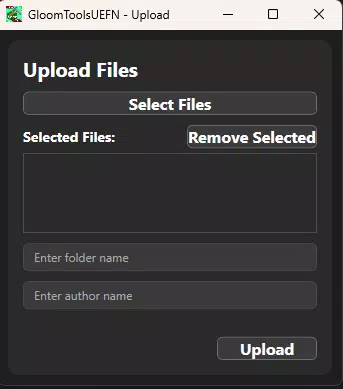
- User Contributions Platform: Developers can upload and share custom components, assets, and scripts. This expands the toolset’s functionality and promotes a collaborative environment where innovation is community-driven.
- Easy Integration Framework: The toolset is designed to be seamlessly incorporated into both new and existing Unreal Engine projects. Minimal configuration is required, reducing setup time and lowering the barrier for entry, especially for less experienced developers.
- Community-Driven Development Cycle: The app evolves based on user feedback and contributions. This ensures that the toolset remains relevant and aligned with current development trends, empowering users to influence its roadmap and feature set.
For example, a solo developer building a multiplayer survival game could use the Persistent Universe Device to ensure that world events like weather changes or structure destruction remain visible across sessions. Meanwhile, the Ranking System could be used to track player survival times, creating a competitive element that drives replayability. The ability to share custom components allows developers to build upon each other’s work, accelerating innovation across projects.
Interface, UX & Performance
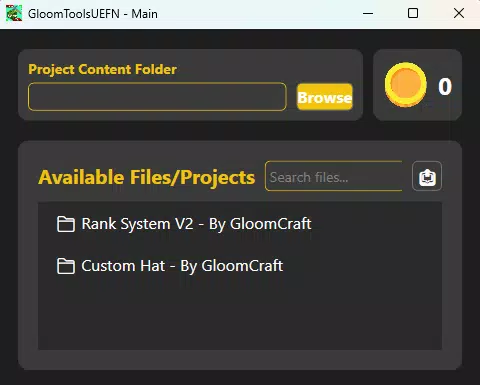
The user interface of GloomTools UEFN appears to be optimized for clarity and functionality, catering to developers who prioritize efficiency. The layout likely centers around a modular dashboard that organizes tools by category—such as persistence, ranking, and community assets—allowing for quick navigation. Visual design emphasizes readability and logical grouping, with minimal distractions to support focused work.
Navigation is expected to follow a linear, task-oriented flow, guiding users from tool selection to integration steps. The app’s responsiveness is likely consistent across mid-to-high-end Android devices, though the developer did not specify exact performance benchmarks. Although the developer did not list formal performance metrics, the app’s lightweight nature (250 MB) suggests it is designed to run efficiently without consuming excessive memory or storage.
Stability is assumed to be strong given the app’s focus on integration rather than heavy computation. However, specific crash reports or load-time data were not disclosed. The app’s performance on older Android devices remains unclear, as compatibility information was not fully disclosed. Nonetheless, its free availability and targeted functionality make it a low-risk option for developers exploring new tools.
Platform Compatibility & Technical Requirements
GloomTools UEFN is available exclusively on the Android platform. It requires Android OS version 8.0 or higher, although the developer did not specify minimum OS requirements. The app has a file size of 250 MB, which is moderate for a development tool, indicating that it includes a substantial library of pre-built components and assets.
Version 1.2.0 was released on August 7, 2024, suggesting ongoing development and active maintenance. The app is currently free to download and use, with no in-app purchases or subscription tiers reported. While the developer did not list specific hardware requirements, the app’s size and nature imply it is compatible with most modern Android smartphones and tablets.
Pros and Cons
Pros
- Free to download and use, lowering the barrier to entry for developers.
- Designed for seamless integration with Unreal Engine for Games (UEFN).
- Offers pre-built, ready-to-use components that save development time.
- Supports community-driven contributions, promoting collaboration and innovation.
- Lightweight at 250 MB, suitable for mobile use during development workflows.
Cons
- Platform availability is limited to Android; no iOS or desktop versions were mentioned.
- Specific technical requirements and performance data were not disclosed.
- Compatibility with older Android devices is uncertain.
- Developer background and prior project history were not provided.
- No information on update frequency or long-term support strategy.
FAQ
Is GloomTools UEFN compatible with iOS devices?
Currently, the app is only available on Android. No iOS version has been announced.
Can I use GloomTools UEFN with Unreal Engine versions other than UEFN?
The app is specifically tailored for Unreal Engine for Games (UEFN). Compatibility with other Unreal Engine versions has not been confirmed.
Is the app safe to download and install?
Yes, the app is free and available through official channels. It does not require elevated permissions beyond standard access needed for file management and integration.
How often are updates released?
Updates are released periodically, with the latest version (1.2.0) published on August 7, 2024. Specific update schedules were not disclosed.
Can I contribute my own tools to the platform?
Yes, the app supports user contributions, allowing developers to upload and share custom components and assets with the community.
Final Thoughts
GloomTools UEFN stands out as a practical, developer-focused utility that enhances productivity for Unreal Engine for Games users. Its modular design, community-driven model, and emphasis on integration make it a valuable asset for game creators aiming to accelerate development without compromising on functionality. The inclusion of features like persistent world management and competitive ranking systems addresses common challenges in game design, offering real-world solutions for both indie and small studio developers.
While platform limitations and a lack of detailed technical specifications exist, the app’s free model and mobile accessibility provide a compelling advantage. Developers who work on UEFN projects and value collaborative innovation will find the most benefit from this tool. It bridges the gap between complex engine workflows and accessible, on-the-go development support.
Download GloomTools UEFN now


